1. Sync to a height and stop#
[node]
maximum_height = 900,000
bs will not download a block above that height.
2. Milestone sync#
A milestone is a block you have previously validated and therefore know to be valid, which implies that all preceding blocks are valid. A milestone sync verifies the identity of the milestone block and all of its ancestors, and validates the blocks above it. The default milestone is block 950,000.
[bitcoin]
milestone = 000000000000000000010b93c9ea1c29fea277383f0f7d1f26de8b5802e885ff:950000
Pruning reduces download and store size under a milestone sync. With
node.limited_blocks, blocks under the milestone are downloaded and stored
without their input scripts and witnesses, and the node serves only
blocks above the milestone to peers.
[node]
limited_blocks = true
Fixed at store creation. The values are recorded in the store when the store is created. Each time the store is opened, the recorded values are used in place of the configured values, and a configured value that differs from its recorded value is logged. Changing them requires a new store (Settings fixed at store creation).
3. Full validation#
To validate every block, set the milestone to the genesis block:
[bitcoin]
milestone = 000000000019d6689c085ae165831e934ff763ae46a2a6c172b3f1b60a8ce26f:0
Fixed at store creation. The value is recorded in the store when the store is created. Each time the store is opened, the recorded value is used in place of the configured value, and a configured value that differs from it is logged. Changing it requires a new store (Settings fixed at store creation).
4. Checkpoints#
Checkpoints are consensus checks, and removing them is a hard fork. However, to do so set a checkpoint to the genesis block:
[bitcoin]
checkpoint = 000000000019d6689c085ae165831e934ff763ae46a2a6c172b3f1b60a8ce26f:0
5. Admin site#
bs serves its own administrative site, which also utilizes its native
REST interface. Here both are limited to the local machine:
[admin]
bind = 127.0.0.1:8080
bind = [::1]:8080
connections = 10

[native]
bind = 127.0.0.1:8180
bind = [::1]:8180
connections = 10
To view the admin site open http://localhost:8080 in a browser. Its pages
are admin REST queries rendered as HTML, the default for a browser request.
The same paths return data when JSON is requested, with format=json or an
Accept: application/json header.
To serve a custom admin site from a directory instead of the embedded site,
set admin.path. A request for / returns admin.default
(index.html).
The admin interface is libbitcoin's own, and provides:
- HTTP and websocket on each port. Over a websocket, each frame is one
request path, and
log_subscribeandevent_subscribestream the node's log and events. - TLS on its
safeaddresses (Secure connections), with optional client certificates (Authentication). - Credentials (Authentication), restricted by REST method names.
6. Block explorer#
The native REST interface serves the block explorer. Here it is limited to the local machine:
[native]
bind = 127.0.0.1:8180
bind = [::1]:8180
connections = 10
To view the block explorer open http://localhost:8180 in a browser.
The explorer is the native REST interface rendered as HTML, the default for a
browser request. The same paths return each result in any of four formats,
chosen with format= or the Accept header:
| Format | Media type | Result |
|---|---|---|
html |
text/html |
The explorer page |
json |
application/json |
JSON |
text |
text/plain |
Hex encoded bytes |
data |
application/octet-stream |
Raw bytes |
For example, the genesis block header as JSON:
http://localhost:8180/v1/block/height/0/header?format=json
returns:
{
    "hash": "000000000019d6689c085ae165831e934ff763ae46a2a6c172b3f1b60a8ce26f",
    "version": 1,
    "previous": "0000000000000000000000000000000000000000000000000000000000000000",
    "merkle_root": "4a5e1e4baab89f3a32518a88c31bc87f618f76673e2cc77ab2127b7afdeda33b",
    "timestamp": 1231006505,
    "bits": 486604799,
    "nonce": 2083236893
}
Every path, with examples, is documented in Native REST.
Query options, besides format:
| Option | Applies to | Purpose |
|---|---|---|
witness=false |
block, transaction and input paths | Omit witness data |
turbo=false |
address paths | Run the query on one thread instead of all (see database.turbo) |
stop=true |
subscribe paths | End the subscription |
To serve a custom block explorer from a directory instead of the embedded
site, set native.path. A request for / returns native.default
(index.html).
The native interface is libbitcoin's own, and provides:
- HTTP and websocket on each port. Over a websocket, each frame is one
request path, and the
subscribepaths (top, block, transaction, output and address) push notifications. - Data, text, JSON and HTML formats for each path.
- TLS on its
safeaddresses (Secure connections), with optional client certificates (Authentication). - Credentials (Authentication), restricted by REST method names.
7. Electrum server#
Electrum on its assigned ports (Conventional Ports), clear and secure (Secure connections):
[electrum]
bind = 0.0.0.0:8580
safe = 0.0.0.0:8543
connections = 100
cert_path = server.pem
key_path = server.key
Beyond the standard Electrum transports (TCP and TLS), bs provides:
- HTTP and websocket on the same ports. Subscriptions need a full duplex transport (TCP or websocket), so an HTTP connection's subscriptions are held until it upgrades to a websocket.
- Client certificates on its
safeaddresses (Authentication). - Credentials (Authentication), restricted by RPC method names. A credential refuses raw TCP clients.
8. Bitcoind RPC#
The RPC interface listens on its default port, 8280, here limited to the local machine.
[bitcoind]
bind = 127.0.0.1:8280
bind = [::1]:8280
connections = 10
credential = user:password
A credential may end with a list of the methods it permits (Authentication), here three RPC methods and the matching REST block request:
[bitcoind]
credential = reader:password:getblockcount,getblockhash,getblock,block
Beyond the standard bitcoind interfaces (JSON-RPC over HTTP, and REST),
bs provides:
- JSON-RPC over websocket and raw TCP on the same ports.
- TLS on its
safeaddresses (Secure connections), with optional client certificates (Authentication). - Credentials (Authentication) for REST as well as RPC, restricted by RPC and REST method names, which are distinct. A credential refuses raw TCP clients.
9. BTCD RPC#
The btcd RPC interface listens on its default port, 8480, here limited to the local machine:
[btcd]
bind = 127.0.0.1:8480
bind = [::1]:8480
connections = 10
credential = user:password
The BTCD interface is the Bitcoind RPC interface (Bitcoind RPC) with btcd's
methods added. Unlike btcd's own implementation, the methods it inherits
behave exactly as they do in [bitcoind].
A websocket or raw TCP client may authenticate after connecting, with
btcd's authenticate method. A failed authenticate closes the
connection. A request for a method the credential does not permit returns
an invalid parameters error.
Beyond the standard btcd transports (HTTP and websocket, with TLS),
bs provides:
- JSON-RPC over raw TCP on the same ports.
- Client certificates on its
safeaddresses (Authentication). - Credentials (Authentication), restricted by RPC method names. Raw TCP clients
authenticate with
authenticate.
10. ZMQ notifications#
ZMQ publishes on its default port, 8380, here limited to the local machine.
[zmq]
bind = 127.0.0.1:8380
bind = [::1]:8380
connections = 10
Beyond the standard bitcoind notifications, bs provides CurveZMQ on its
safe addresses (Secure connections): encrypted notifications, optionally only to
the client keys listed in zmq.cert.
11. Esplora#
The Esplora interface, on its assigned port:
[esplora]
bind = 0.0.0.0:8780
connections = 100
To serve existing Esplora clients, bind it to the port they expect
instead (Conventional Ports). esplora.maximum_history limits the entries returned for
one address.
Beyond the standard Esplora interface, bs provides:
- Websocket on the same ports. Each frame is one request path, and a request with a body (a broadcast) follows the path with a newline and the body.
- TLS on its
safeaddresses (Secure connections), with optional client certificates (Authentication). - Credentials (Authentication), restricted by REST method names.
12. Client filters (BIP157/158)#
[node]
provide_filters = true

[table.filter_bk]
buckets = 950001

[table.filter_tx]
buckets = 950001
Any count above 0 on both tables enables the client filters index. The value given initializes the index to entries for that many blocks, but the index grows as required.
Fixed at store creation. The value is recorded in the store when the store is created. Each time the store is opened, the recorded value is used in place of the configured value, and a configured value that differs from it is logged. Changing it requires a new store (Settings fixed at store creation).
13. Disable the address index#
The address index is enabled by default. Setting the outs table's
buckets to 0 disables it:
[table.outs]
buckets = 0
Fixed at store creation. The value is recorded in the store when the store is created. Each time the store is opened, the recorded value is used in place of the configured value, and a configured value that differs from it is logged. Changing it requires a new store (Settings fixed at store creation).
14. Silent payments#
Silent payments are indexed from node.silent_start_height, and never below
taproot activation, so 0 indexes from there. The index is served to Sparrow
by the [sparrow] service, the Electrum protocol with silent payment
extensions:
[node]
silent_start_height = 0

[sparrow]
bind = 0.0.0.0:8680
safe = 0.0.0.0:8643
connections = 100
cert_path = server.pem
key_path = server.key
The Sparrow interface is the Electrum interface with silent payment and
block statistics methods added, and provides the same transports and
security as [electrum] (Electrum server).
Fixed at store creation. The value is recorded in the store when the store is created. Each time the store is opened, the recorded value is used in place of the configured value, and a configured value that differs from it is logged. Changing it requires a new store (Settings fixed at store creation).
15. Anonymizing networks#
bs connects to peers over Tor and I2P as well as the clear network, and
can bridge between them.
Tor#
Outbound through Tor's SOCKS5 proxy, inbound through a Tor hidden service
(HiddenServiceDir and HiddenServicePort in torrc) pointing at the node's
listening port, and onion address gossip:
[outbound]
socks = 127.0.0.1:9050
seed = <first seed onion address>.onion:8333
seed = <second seed onion address>.onion:8333

[inbound]
self = <hidden service onion address>.onion:8333

[peer]
gossip_tor = true
inbound.self advertises the hidden service address to peers, so they can
connect to the node over Tor. Seeds are connected through the proxy, so the default seeds work where Tor
can reach them. An onion-only node lists onion seeds.
outbound.socks proxies the outbound session and its seeds. Manual peers
(Fixed peers) use their own manual.socks. Each takes an optional
username and password.
I2P#
Outbound through the SOCKS5 proxy pointed at an I2P router's SOCKS port,
inbound through the router's SAM bridge, and I2P address gossip. The
destination key file is created if it does not exist, and the I2P address
derived from it is advertised to peers, so inbound.self is not needed:
[outbound]
socks = 127.0.0.1:4447
seed = <first seed destination>.b32.i2p
seed = <second seed destination>.b32.i2p

[inbound]
sam = 127.0.0.1:7656
key_path = i2p.key

[peer]
gossip_i2p = true
Seeds are connected through the proxy, which reaches only I2P destinations, so an I2P node lists I2P seeds. I2P has no ports, so none is given.
outbound.socks proxies the outbound session and its seeds. Manual peers
(Fixed peers) use their own manual.socks. Each takes an optional
username and password.
Bridging#
bs can reach peers on the clear network (IPv4 and IPv6), Tor and I2P. A
node on more than one of them is a bridge: it relays blocks, transactions
and addresses between them. Three things place a node on a network:
- Gossip. The
peer.gossip_*settings select the address types the node accepts, keeps, connects to and relays. An address of a network that is not gossiped is dropped when it is received or loaded. - Outbound. With
outbound.socks, every outbound connection goes through the proxy, clear addresses included (for Tor, through exit relays). Without it, outbound connects directly, and only to IP addresses. An onion or I2P address that is gossiped but cannot be connected to is still kept and relayed. Manual peers use their ownmanual.socks. - Inbound. The node accepts on each
inbound.bind(by default0.0.0.0:8333, every IPv4 adapter), on a Tor hidden service that forwards to a binding, and on the I2P SAM bridge wheninbound.samis set.
| Setting | Default | Addresses |
|---|---|---|
gossip_ipv4 |
true | IPv4 |
gossip_ipv6 |
false | IPv6 and CJDNS |
gossip_tor |
false | Tor v3 onion |
gossip_i2p |
false | I2P |
Onion and I2P addresses are relayed only in address v2 messages (BIP155,
peer.enable_address_v2, on by default).
Every gossiped inbound.self, and the I2P address derived from
inbound.key_path, is sent to every peer in address messages, on every
network. The first inbound.self is also sent in each version message
when it is an IP address. A node that advertises a clear address and an
onion address therefore tells every peer, onion peers included, that both
are the same node.
Bridging, desired.
Bridges are necessary to the network. Without them, Tor-only and I2P-only nodes would form separate networks, each with its own blocks and transactions, unable to reach the rest of Bitcoin. Tor and I2P nodes reach blocks and transactions from the clear network through bridges, and their addresses reach clear nodes. A bridge suits a node whose IP address is already public, such as a server, since bridging gives up the anonymity of its onion or I2P address. Clear outbound and inbound, with Tor peers accepted through a hidden service:
[inbound]
bind = 0.0.0.0:8333
self = <public IP address>:8333
self = <hidden service onion address>.onion:8333

[peer]
gossip_ipv4 = true
gossip_tor = true
Outbound connections go directly to clear peers, without Tor's latency.
Onion peers connect in through the hidden service, and onion addresses
are relayed to clear peers. Adding outbound.socks would also connect
out to onion peers, but would send every clear outbound connection
through Tor exit relays.
Bridging, avoided.
A node run for privacy stays on one anonymity network:
- Advertising a clear address beside an onion or I2P address links them, as above.
- Clear connections expose the node's IP address, and a node seen on both networks can be linked by what and when it relays.
- Clear peers reached through Tor exit relays depend on those relays, which can observe, delay or filter the traffic. Onion peers are reached without exit relays.
A Tor-only node:
[outbound]
socks = 127.0.0.1:9050
seed = <first seed onion address>.onion:8333
seed = <second seed onion address>.onion:8333

[inbound]
bind = 127.0.0.1:8333
self = <hidden service onion address>.onion:8333

[peer]
gossip_ipv4 = false
gossip_tor = true
gossip_ipv4 = falsekeeps clear addresses out of the address pool, so no connection goes through an exit relay and no clear address is relayed.- The loopback binding accepts only connections from the hidden service
(
HiddenServicePort 8333 127.0.0.1:8333intorrc), not from the clear network. - Only the onion address is advertised.
- Manual peers connect directly unless
manual.socksis set.
An I2P-only node is the same with the I2P proxy and seeds
(above), gossip_i2p = true in place of gossip_tor, and the
loopback binding, since inbound I2P connections arrive through the SAM
bridge.
Tor and I2P together.
A node can accept on both, through a hidden service and the SAM bridge, but its one outbound proxy reaches only one network. With gossip of the other network on, its addresses are relayed, and outbound attempts to them through the proxy fail. Advertising both addresses links them, as with a clear address.
16. Fixed peers#
[manual]
peer = 192.168.0.10:8333
peer = 192.168.0.11:8333

[outbound]
connections = 0

[inbound]
connections = 0
Manual peers are automatically reconnected after a delay
(network.retry_timeout_seconds) when they drop.
outbound.connections = 0 disables the outbound session, which otherwise
connects to peers from the address pool, and inbound.connections = 0
disables the inbound session, which otherwise accepts peers that connect to
the node. The node then exchanges only with the peers listed.
17. Peer services and policy#
What the node provides to and requires of its peers, and its transaction policy:
[node]
limited_blocks  = true      # pruned blocks
provide_blocks  = true      # provides blocks
require_blocks  = true      # requires blocks
provide_witness = true      # provides witnesses (bip144)
require_witness = true      # requires witnesses (bip144)
provide_filters = false     # serves client filters (bip157)
provide_privacy = true      # opportunistic encryption (bip324)
delay_inbound = true
fee_estimate_horizon = 0
minimum_fee_rate = 0.000001
node.limited_blocksprunes blocks under the milestone (Milestone sync), and the node then serves only blocks above it.node.provide_filtersalso requires the client filter tables (Client filters (BIP157/158)).node.delay_inboundrefuses inbound peers, and client services other than[admin]and[native], until the chain is current.node.fee_estimate_horizonis the number of recent blocks used for fee estimates, at most 1,008 (one week).0disables fee estimation.node.minimum_fee_rateis the lowest fee rate, in BTC per thousand virtual bytes, of an unconfirmed transaction the node accepts. It is also reported to clients as the relay fee.
Which peer messages the node sends and accepts:
[peer]
enable_relay = true         # in/out transaction announcements
enable_alert = false        # send/log alert messages (no send option)
enable_reject = false       # send/log reject messages
enable_compact = true       # in/out compact block announcements
enable_address = true       # in/out address messages (false disables address v1 and v2)
enable_address_v2 = true    # in/out address v2 messages (drops down to v1 if gossip is IP only)
enable_witness_tx = true    # in/out wtxid for tx announcements
enable_memory_pool = true   # respond to mempool message with full pool
enable_not_found = true     # send not_found messages (vs. dropping peer for requesting what we don't have)
18. Integrated load balancing#
outbound.bind balances outbound peer connections across network
adapters. Each binding is the address of an adapter, and each outbound
connection slot is assigned one binding in turn. With this integrated load
balancing, combining several adapters or internet connections needs no
dedicated load balancer: no multi-WAN router, link aggregation or
balancing appliance.
Without bindings#
outbound.bind is empty by default, and the operating system chooses the
adapter of each connection from its routing table. With several adapters
that is the adapter of the preferred default route, so every outbound
connection uses one adapter and the others carry none. On a machine with
two 2.5 Gbps adapters, one on a fiber provider and one on a cable provider,
all 98 peer connections used the fiber adapter, and download was limited
to that one adapter and provider.
Balancing#
One binding per adapter splits the connections evenly:
[outbound]
bind = 192.168.0.20
bind = 192.168.0.21
connections = 100
Each adapter carries 50 connections. A slot always reconnects on its own adapter, so the split holds for as long as the node runs.
Shaping#
The split follows the list, so an address listed more than once gets a proportionally larger share. Two bindings of the first adapter and one of the second give the first twice the connections of the second:
[outbound]
bind = 192.168.0.20
bind = 192.168.0.20
bind = 192.168.0.21
connections = 99
The first adapter carries 66 connections and the second 33, for example to match a 2 Gbps connection and a 1 Gbps connection. Connections are spread by count, not by bandwidth, so the weights are set by the list.
Restricting adapters#
The bindings are also a whitelist. Outbound connections use only the listed adapters, so an adapter left out of the list carries no peer connections. On a machine with a wired adapter and WiFi, binding only the wired address keeps peers off WiFi, even when WiFi holds the preferred default route:
[outbound]
bind = 192.168.0.20
On Linux this also needs the routing rule for the wired address
(below), or connections bound to it still leave through the default
route. The whitelist applies to the outbound connections of bs, not to
other traffic on the machine, and not to inbound connections (below).
Notes#
- Give the address without a port. The operating system assigns the source port.
- An IPv4 binding connects only to IPv4 peers, and an IPv6 binding only to IPv6 peers. List one address per adapter to balance by adapter.
- Seed connections use
outbound.bind. Manual peers usemanual.bind, assigned in the order the peers are listed. - Through a SOCKS5 proxy, the binding applies to the connection to the proxy.
- The slots of an adapter that is down stay idle and retry until it returns.
Outbound bindings do not affect inbound connections, which are accepted
on the inbound.bind addresses. Inbound defaults to 0.0.0.0:8333, and
accepts connections on every IPv4 adapter. To accept peers only on the same adapters, bind
inbound to the same addresses:
[inbound]
bind = 192.168.0.20:8333
bind = 192.168.0.21:8333
Whether a bound connection actually leaves through its adapter depends on the operating system:
- Windows routes a connection through the adapter that owns its bound address. The bindings are sufficient.
- macOS scopes the route lookup to the adapter that owns the bound address. The bindings are sufficient.
- Linux routes by destination and ignores the bound address, so every connection leaves through the adapter of the preferred default route. Each adapter needs its own routing table and a rule that selects it by source address.
For two Linux adapters on one subnet, eth0 at 192.168.0.20 and eth1
at 192.168.0.21, with gateway 192.168.0.1:
$ sudo ip route add default via 192.168.0.1 dev eth0 table 100
$ sudo ip route add default via 192.168.0.1 dev eth1 table 200
$ sudo ip rule add from 192.168.0.20 lookup 100
$ sudo ip rule add from 192.168.0.21 lookup 200
$ sudo sysctl -w net.ipv4.conf.all.arp_filter=1 net.ipv4.conf.all.arp_ignore=1 net.ipv4.conf.all.arp_announce=2
All five lines are required. The tables and rules send each connection out through its bound adapter. The last line makes each adapter answer only for its own address, so that replies also arrive on that adapter. Adapters on separate networks need only the tables and rules, each with its own gateway. Confirm the route of a bound address with:
$ ip route get 1.1.1.1 from 192.168.0.21
These commands do not persist across a reboot. Add the same tables and rules to the distribution's network configuration (netplan, systemd-networkd or NetworkManager).
Adapters on one subnet share its gateway, so their combined bandwidth is also limited by the gateway's uplink.
Two internet connections#
Adapters on separate networks, each with its own gateway and internet
provider, add their providers' bandwidth. For enp11s0 at 192.168.0.219
(gateway 192.168.0.1) and enp12s0 at 192.168.1.67 (gateway
192.168.1.1):
[outbound]
bind = 192.168.0.219
bind = 192.168.1.67
$ sudo ip route add default via 192.168.0.1 dev enp11s0 table 100
$ sudo ip rule add from 192.168.0.0/24 table 100 priority 100
$ sudo ip route add default via 192.168.1.1 dev enp12s0 table 101
$ sudo ip rule add from 192.168.1.0/24 table 101 priority 101
Without the rules, connections from the second address leave through the first gateway, whose NAT drops them. Rules that match the subnet, rather than the address, remain valid when a DHCP lease changes the address. With NetworkManager the same tables and rules persist, set once per connection:
$ sudo nmcli connection modify "<connection 1>" ipv4.routes "0.0.0.0/0 192.168.0.1 table=100" ipv4.routing-rules "priority 100 from 192.168.0.0/24 table 100"
$ sudo nmcli connection modify "<connection 2>" ipv4.routes "0.0.0.0/0 192.168.1.1 table=101" ipv4.routing-rules "priority 101 from 192.168.1.0/24 table 101"
$ sudo nmcli device reapply enp11s0
$ sudo nmcli device reapply enp12s0
Each bound address should then reach the internet through its own provider, and report that provider's public address:
$ curl --interface 192.168.0.219 https://api.ipify.org
$ curl --interface 192.168.1.67 https://api.ipify.org
Reverse-path filtering must be loose (net.ipv4.conf.*.rp_filter = 2,
the Ubuntu default), since strict filtering (1) can drop replies on a
host with several adapters. Windows and macOS need no routing changes.
On the fiber and cable machine above (Ubuntu 26.04), with both bindings the peers split 40 and 35, and one minute of download measured 191 MB/s on fiber and 250 MB/s on cable, about 3.5 Gbps in all, more than one 2.5 Gbps adapter carries.
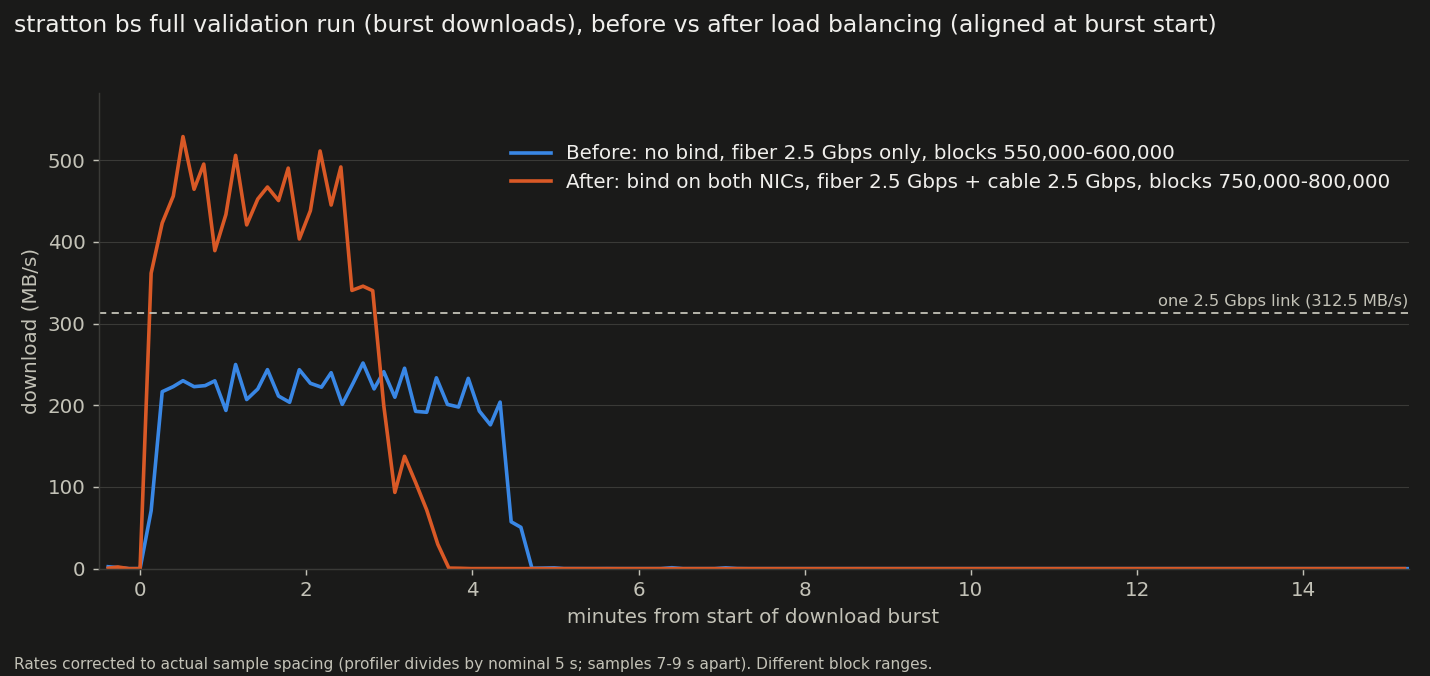
The chart overlays one 50,000-block download batch from each of two full validation runs, which download in bursts, aligned at the start of the batch. Without bindings (fiber only, blocks 550,000 to 600,000) the batch took 4.6 minutes at a mean of 206 MB/s, below the 312.5 MB/s of one 2.5 Gbps link. With both bindings (fiber and cable, blocks 750,000 to 800,000) it took 3.6 minutes at a mean of 368 MB/s, about 1.8 times the rate: about 40% more data in about 20% less time. The block ranges differ, and the later blocks are larger.
- A change to the bindings or routing applies only to new connections.
Restart
bsto rebalance. - A multipath default route (kernel ECMP) is not a substitute. It hashes each new connection to a route, so the split depends on the hash rather than on the bindings.
- A host with several adapters can end up with a global IPv6 address on
one adapter and its IPv6 default route on another, which leaves IPv6
unusable. Seed names resolve to IPv6 first, so seeding then times out
("seeding unsuccessful"). Correct the adapter configuration, or prefer
IPv4 in name resolution with
precedence ::ffff:0:0/96 100in/etc/gai.conf.
Inbound#
Inbound connections are not balanced by bs, since the remote peer
chooses which address to connect to. bs can make each connection
reachable and advertise it:
[inbound]
self = 203.0.113.10:8333
self = 198.51.100.20:8333
- Each provider's router forwards port 8333 to its adapter's address.
- Each
inbound.selfis a provider's public address. Every one is sent in address messages, and the first in the version message. Peers relay them, and each peer chooses one to connect to. - The split follows the peers' choices and cannot be shaped. Listing an address twice does not change it.
- On Linux the same routing tables and rules are required, since replies leave from the address the connection arrived on.